
At RIMPA Live in Sydney, WyldLynx ran the coffee cart, and I ran the session that went with it. I stood between a room of records and information professionals and lunch, so I kept it to a menu: a starter, a main, a side, a chef's special, and a sweet treat. Five courses drawn from the work we do with clients and inside our own business.
The theme was practical: understand the information you hold, make it easier for people to work with it, and give AI a useful job rather than access to the whole buffet. If you would rather read than watch, the menu follows.
Starter: data discovery and risk protection
Before we serve anything, we need to know what is in the kitchen. What information do you hold? Where is it stored? Who can access it? What is duplicated, obsolete, sensitive or unmanaged? What should be retained, protected or disposed of?
Those questions become harder when information is spread across network drives, mailboxes, collaboration tools and legacy systems. Valuable or sensitive material can sit outside the approved records system. You don't know what you don't know, and discovery gives you a better place to start.
A large government organisation engaged us to find credit card data. We scanned an agreed set of sources, including Content Manager, network drives and mailboxes. Alongside the payment data, the scan identified thousands of passport and healthcare identifiers. A project with a narrow finance objective had uncovered a much wider information risk.
Finding a pattern is the start of the investigation. You still need to validate the findings, understand why the information is held and decide what action is appropriate. Some information needs protection or better access controls. Some may be eligible for disposal under the organisation's requirements. A scan only tells you about the sources and content it could inspect; it does not prove there is nothing sensitive elsewhere.
That is why I like starting with a defined slice of information. A proof of value can help establish what discovery would tell you before you commit to a broader programme. Scope and timing need to be agreed. The platform we use is OpenText Data Security Platform.
Main: easier compliance with Content Manager
Compliance does not need to be 400 fields. I have seen systems that present users with a wall of mandatory metadata, with nobody able to explain why it is all necessary. We put the burden on users and then wonder why they go around the system.
The better approach takes discipline. Reduce unnecessary decisions, capture information in the flow of work and apply governance behind the experience. Use familiar structures and simple language. Make the compliant action the easiest action.
Instead of asking everyone to understand records terminology before saving a document, build the records requirements into the business process wherever you can. People don't hate compliance. They hate complicated systems.
I learned this the hard way. Years ago, I built a Content Manager system that behaved like a network drive, and a well-respected figure in the records profession tore strips off me for it. She came around, and we went on to deliver something together that we were both proud of. The principle held: people need a way of working they understand.
So let me lift the lid on our own kitchen. WyldLynx works remotely, using Microsoft 365 and Azure, and we pay for, license and use Content Manager ourselves. We have used it since the business started.
Client files, software and licensing records, support tickets and project content are part of that working environment. Our training content has its own record types and metadata, including product module, version and user type. A workflow takes it through creation, review, formatting and finalisation. Those are ordinary business tasks, with records management built into them.
Content Manager can be built around your business processes, reduce manual effort and sit behind other systems. If yours is making life harder, look at the process, interface design, configuration and training together. There may be a much simpler way to do the job with the platform you already have.
Side: safer collaboration with Microsoft 365
Users want to work in Microsoft Teams and SharePoint. If capturing a record means stopping work, switching applications and repeating information, it is hardly surprising when the extra step gets missed.
Microsoft 365 has governance and records management capabilities of its own. The question is how your organisation has configured them, who owns the decisions and how they fit with Content Manager. Information management needs a seat at that table alongside IT.
In the session, I showed two ways that collaboration and records management can work together. The first was the Content Manager app in Microsoft Teams. I call it a pane of glass: access to Content Manager from Teams, without asking an occasional user to start in a separate application. Depending on the supported version and setup, that can include searching for records, viewing or updating properties and working with notes or workflows.
The second was capture driven by rules. The records team defines which content should be captured, where it belongs and what record type and security should apply. An appropriately configured integration can capture files from a channel and manage subsequent changes. The user gets on with the job, with less manual filing.
That still needs design and testing. Licensing, versions, permissions and configuration affect what is available. You need to understand how changes, versions, access and failures are handled, rather than assume that turning on a connector has solved governance.
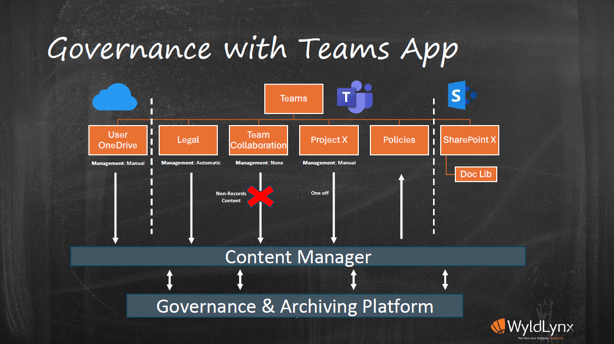
One CIO asked me for “Teams integration”. When we talked it through, what he wanted was to check a document out to OneDrive, share it with colleagues, edit it together and check it back in. That was a capability of the product he already owned. We use that approach for client quotes ourselves.
Before buying another add-on, work through the actual task and check what your existing products support. Our Content Manager and Microsoft 365 integration work starts with that conversation.
Chef’s special: tailored solutions
This is what I call the WyldLynx secret sauce: using Content Manager around the work people need to do, rather than making the work fit the default screen.
An information access unit in a hospital and health service needed a more consistent way to manage cases across five facilities. WyldLynx worked through its requirements in workshops and helped build a solution around Content Manager, with a custom web interface and documents generated from templates using record metadata.
Case officers could work with the fields and actions relevant to their job. Updating information at its source also made it easier to generate the documents needed for a case, rather than repeatedly entering the same details.
The customer-authored case study, published in 2022, reported that searches previously taking five to ten minutes could be completed in under a minute. It also described shared processes across the five sites. Read the published case study.
The digital barista
People also need answers while they work. How do I do this in Content Manager? Where is the procedure? Is there a quick reference guide? Has anyone had this problem before?
Training can be one of the first things cut from a project and one of the first things users miss. A trusted place to find guidance helps after the classroom session is over.
When I worked on the client side, my boss had the idea of taking training content we already kept in Content Manager and giving it back to the people who needed it. That became the WyldLynx Training Portal.
The portal brings together guides, videos, manuals and technical notes for Content Manager and related tools. It can carry an organisation's branding, so the guidance feels like part of its own working environment.
Usage reporting can also show which material people look for and return to. That gives you a better basis for targeted training than guessing what everyone needs. Make expertise available when people need it, rather than training them once and hoping. Explore Content Manager training with WyldLynx.
Sweet treat: optimising for AI
Here is what we hear: “We want AI across all of our information.” “We want an AI search tool.” “We want a chatbot.”
Here is what I ask next. Who should have access? Which information? What business problem are we solving? What should happen after the answer? What happens when the source information changes?
“Connect it to everything” is a very large scope for a very small brief. A more useful starting point might be approved policies, procedures and work instructions. It gives you a defined collection, a recognisable audience and questions you can test. Even then, you need the information owner involved and agreement about what is in and out.
Content systems can provide a useful source because information may already have structure, ownership and lifecycle controls. That does not make everything inside them suitable for AI. Sensitive information, outdated guidance and inappropriate access still need attention.
The use cases are often quite ordinary: find material related to a matter, summarise a set of briefs, or help draft a document for review. Each needs different checks. Finding a document is not the same as having permission to disclose its contents, and drafting a response is not approval to send or file it.
Before widening access, test the proposed information flow. What can the assistant retrieve under the user's permissions? What is sent to another service, copied, indexed, cached or logged? Who can see those copies? What happens when access is removed or a source document changes? A daily update may not be current enough for the task.
Then test the answers against the approved source material. Can people see where an answer came from? Does it use the right revision? What happens when the evidence is missing or conflicting? Decide who reviews the output and who is accountable for acting on it.
The point is to give AI a tasting plate before the whole buffet. Start with a bounded problem and an approved set of information, learn from the results and expand only when the checks support it. AI readiness starts with your information.
The takeaway menu
- Discovery is for everybody. Understand what you have before you go looking for more.
- Make compliance the easy order. Let people work normally, with records requirements built into the process.
- Serve collaboration with governance. Let people use Microsoft 365 while being clear about how their content is managed.
- Order what your business needs. Start with the task and check the capabilities you already own.
- Give AI a tasting plate. Choose a subset of information and a clear problem, then test before expanding.
Talk to the chefs
If you have a data privacy problem and do not know where to start, are not getting enough value from Content Manager, or want to manage content in Microsoft 365 with less manual handling, we would like to hear what you are working through.
Talk to WyldLynx about your information management priorities or explore how a proof of value works. You can also download the presentation slide deck.