
Over recent months, we’ve been working closely with clients and OpenText to address a performance issue affecting cloud-based deployments of OpenText Content Manager.
This initiative focused on improving the experience for users operating in geographically distributed environments, while maintaining the robustness and capability expected from an enterprise records management platform.
The Problem: How Content Manager Handles Search Results Over Distance
The issue primarily impacted organisations where the application environment was hosted in Sydney, while end users were located in other regions such as Brisbane, Western Australia, and other remote or regional areas.
Users in these locations experienced slower-than-expected performance, particularly when:
- Performing searches
- Loading large result sets
- Navigating records over higher-latency connections
This behaviour was largely attributed to network latency between the user’s location and the hosted infrastructure—something that becomes more noticeable during data-intensive operations.
Three Months Working with OpenText
Over a three-month period, we worked in collaboration with OpenText to investigate, test, and resolve the underlying performance constraints within OpenText Content Manager.
We’re pleased to confirm that this issue has now been addressed within the latest versions of the support releases for 23.4, 24.4 and 25.4. These updates include targeted performance enhancements specifically designed for high-latency, cloud-based environments.
Clients who have upgraded are already seeing improved responsiveness. Further gains can be achieved by enabling the newly introduced Fast Mode setting, particularly for users accessing the system from outside the primary hosting region.
Introducing Fast Mode: A Smarter Approach to Search
Fast Mode is a user-enabled setting designed to improve search responsiveness by optimising how results are returned to the client.
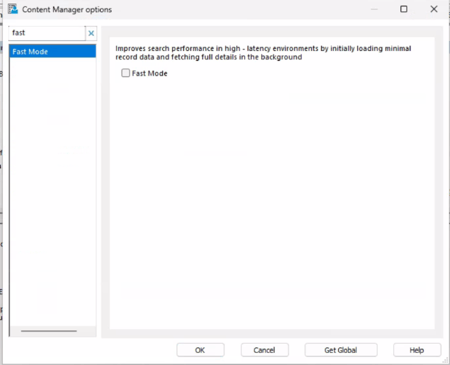
When enabled, Fast Mode:
- Returns search results quickly using a lightweight initial dataset
- Allows users to begin interacting with results immediately
- Continues retrieving full record details in the background
This behaviour is similar to the experience in the web client, where responsiveness is prioritised and information is progressively loaded.
As this is a client-side setting, Fast Mode can be enabled on a per-user basis, allowing organisations to tailor performance based on individual network conditions and usage patterns.
Performance Outcomes
In controlled testing across multiple client environments, Fast Mode delivered measurable improvements in search performance.
By benchmarking identical searches before and after enabling Fast Mode, some clients observed performance improvements ranging from 46% to 87% faster search response times.
These results were achieved using consistent, repeatable test scenarios, ensuring a reliable comparison of user experience before and after enabling the feature.
While actual performance will vary depending on factors such as network latency, dataset size, and infrastructure design, the testing consistently demonstrated a significant reduction in perceived wait times.
When to Enable Fast Mode
Fast Mode is particularly beneficial for:
- Users located in regions such as Brisbane or Western Australia accessing systems hosted in Sydney
- Cloud-hosted environments with geographically distributed teams
- High-latency or bandwidth-constrained connections
- Users working with large or complex search result sets
Not sure where to start?
If your team has been putting up with slow searches, it's worth checking which CM version you're on and whether Fast Mode is live for the users who need it.
We're happy to do a quick configuration check for existing clients. Not sure which version you're running, or want to talk through the upgrade path? Get in touch with the WyldLynx team and we'll sort it out.